
VPN Network Setup
1. Introduction
Virtual private networks, also known as VPN, is widely used by businesses and private users due to its high security during communication over the internet. Business workers very often connect to their workplace remotely using one of the VPN protocols discussed in this article. This ensures that business data remains private and secure during the connection period. Recently, VPN started to become more popular with private users as it provides good level of security and privacy.
There are many protocols that can be used during the VPN communication;
WireGuard: Provides strong security with good speed and is based on IPsec protocol.
Open VPN: Very popular and runs on either TCP or UDP modes, have higher overheads than WireGuard hence uses more resources when it runs on routers or devices.
IKEv2: Runs on IPSec protocol, suitable for mobile devices as it is flexible when changing networks from Wi-Fi to mobile.
Legacy Protocols: [PPTP, L2TP, SSTP] These protocols are no longer in use as they provide limited security and less compatibility with various devices.
In this guide, we will be discussing two of the most popular protocols which are OpenVPN and WireGuard and show you how to set it up using a modern Asus router, but the instructions will apply to other router brands as well. We will only discuss the setup of Client VPN, although it is possible to setup VPN as a server so you can access your devices from outside your premises. It is also possible to establish a VPN connection via software only, not via a router. For example using a computer or mobile phone, again this type of connection will not be dealt with in this article.
2. WireGuard VPN Setup
WireGuard Setup Screen 1
WireGuard VPN Setup Screen 2
This is a relatively new VPN protocol based on IPSec and have great advantage in providing a very secure communication tunnel with low hardware resources requirements when compared to OpenVPN.
The router brands listed below support this VPN protocol. However, the router brand Asus is among the most widely used with most features. Asus WireGuard VPN option is included in many newer routers. However, it is highly recommended to update your Asus router and install the custom firmware produced by Merlin. This is because the AsusWRT Merlin Firmware contains improvement on the standard factory version AsusWRT. The Merlin Firmware adds killer switch, DNS server selection, IP filtering rules and various other settings.
2.1 WireGuard Routers:
List of some routers that support WireGuard VPN protocol:
Asus VPN Routers:
Asus RT-AX52U, RT-AX53U, RT-AX56U, RT-AX58U, RT-AX59U, RT-AX82U, RT-AX86U, RT-AX88U, RT-AX89X, RT-AX1800S, RT-AX5400, GT-AX6000, GT-AX11000, RT-AXE7800, RT-AXE16000
TP-Link VPN Routers:
TP-Link Archer AX12, AX53, AX55, AX80, BE220, BE230, BE400, BE450, BE550, BE800, GE230, GE400, GE800
Deco Mesh Systems, X series, AXE series, BE series
Omada Business Gateways: ER605, ER7206, ER8411
Linksys VPN Routers:
Only supported via custom firmware DD-WRT, Open WRT
2.2 WireGuard Configuration File:
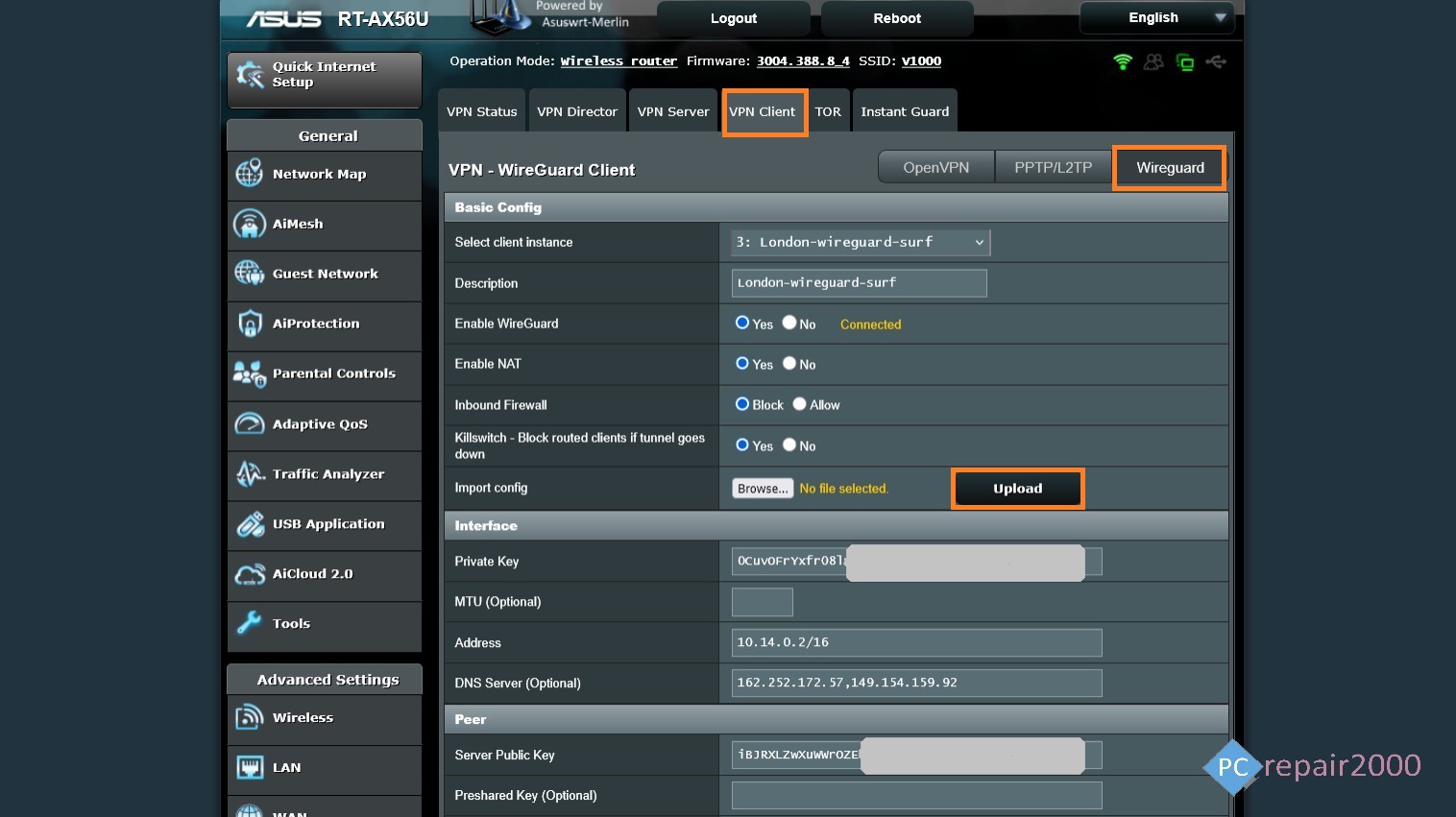
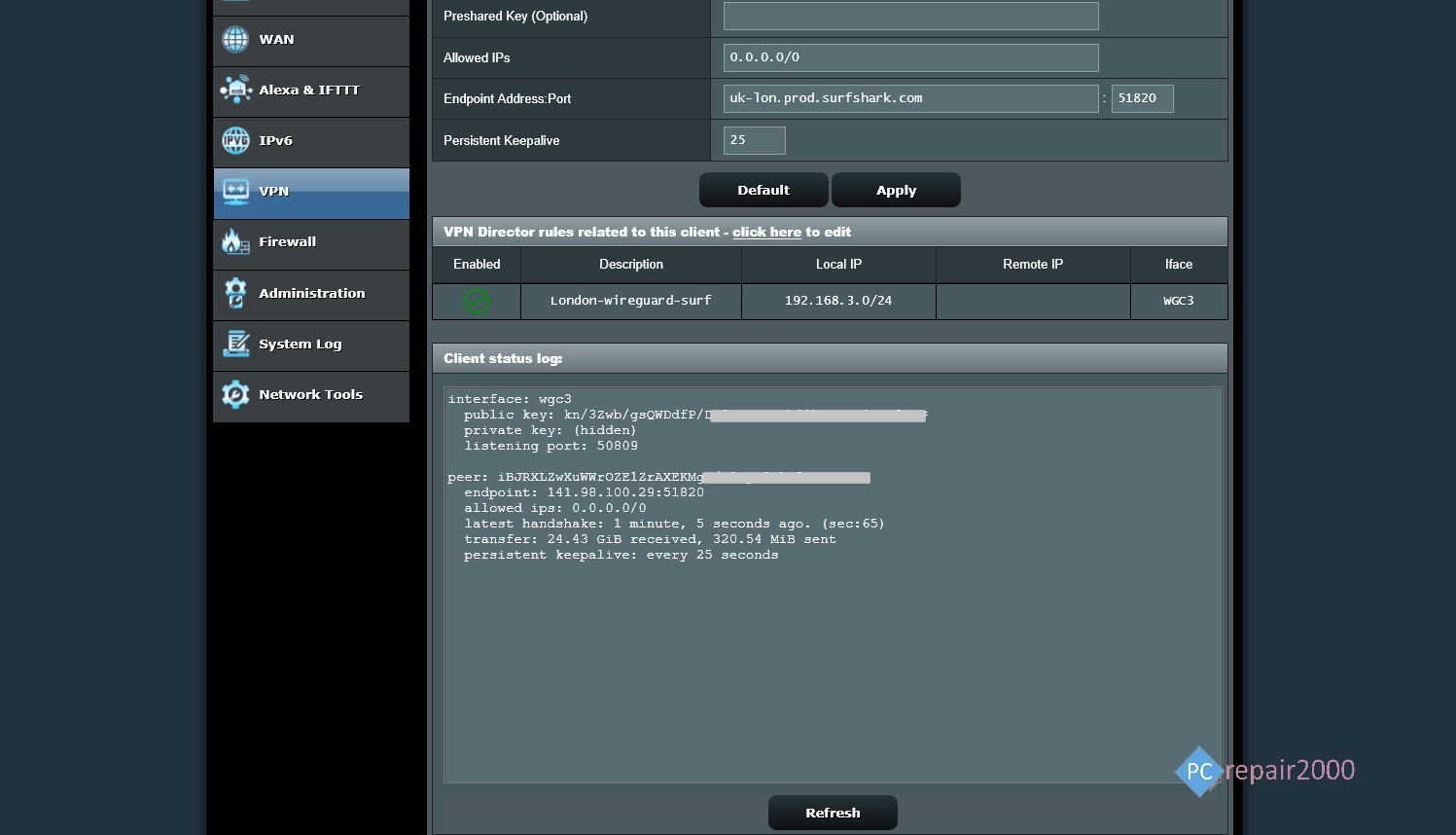
To setup Asus Router WireGuard Client VPN you need to navigate to VPN option in the router main menu and select client VPN setup. You will then be presented with different protocols; PPTP, OpenVPN and WireGuard. Select the WireGuard VPN option and the you should see the settings shown in the two screenshots above.
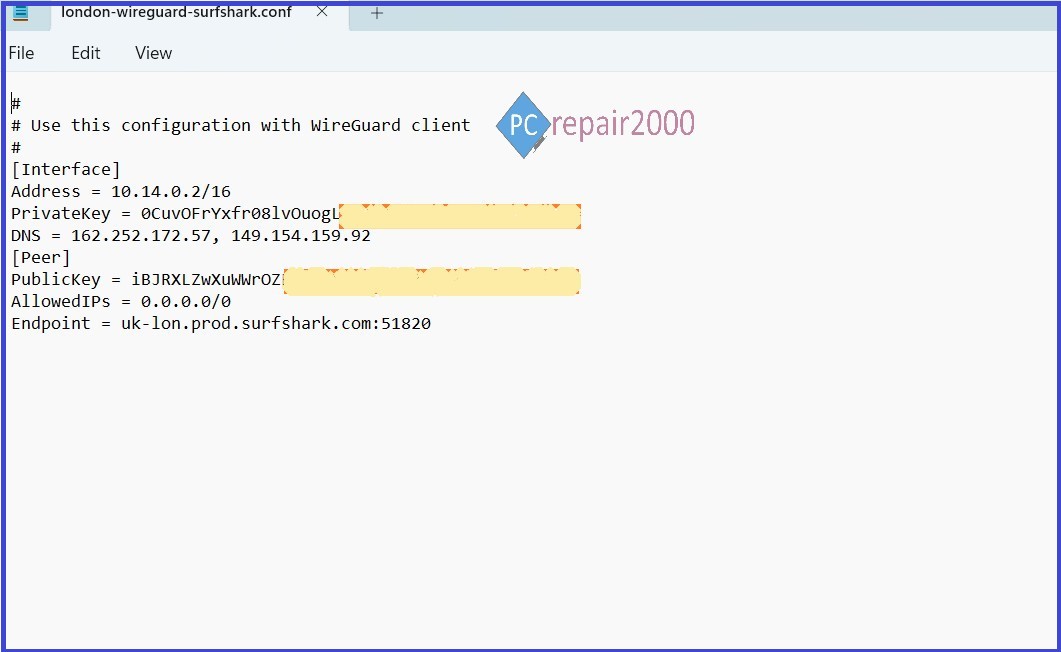
You need to download the WireGuard configuration file [.conf]. The content of this file is shown in the screen below. To obtain the VPN configuration file you need to access your online VPN account, and select manual setup, as show in the screen below, click on Browse to upload the file to your router. You can also enter the values manually by copying the text from the configuration file and entering it to the respective fields.
WireGuard Configuration File
Important: Some VPN providers set a time limit on these files, for example it may expire under certain condition such as if not used for certain time (15 minutes, 30 minutes, or the connection is disconnected for longer than a set period usually (30 min, 60 min, etc). In this case you need to go to your VPN account and generate a new configuration file for your connection, see the screen below.
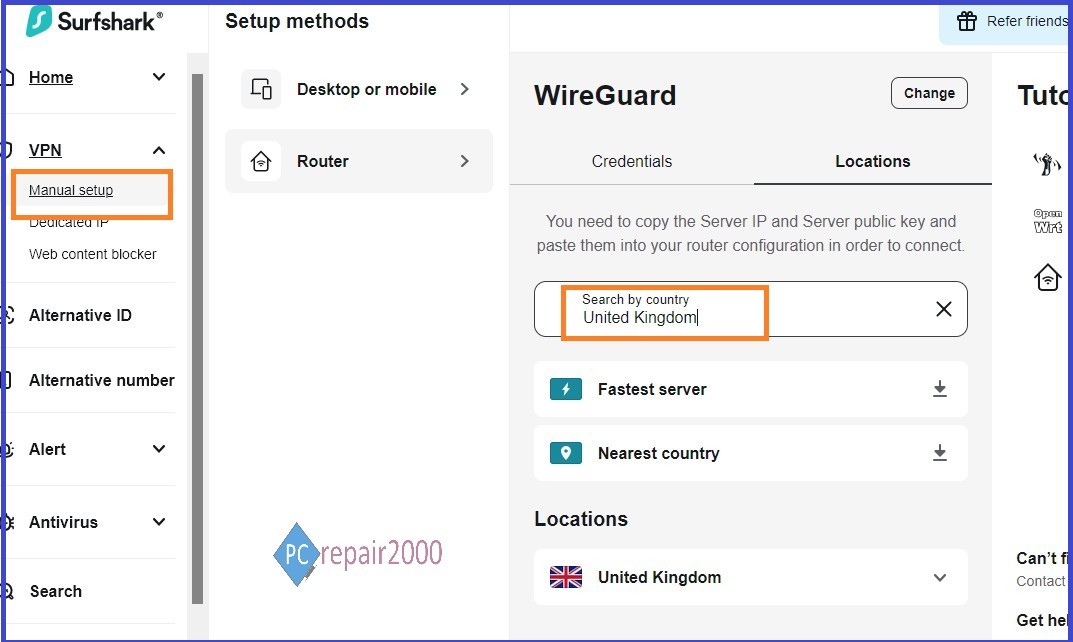
WireGuard VPN Account Setup
2.3 WireGuard Kill Switch:
This is a great feature added when you use Merlin custom firmware in Asus routers. The Kill switch will allow you prevent using your ISP DNS servers when the VPN tunnel is disconnected. In the Asus router setup page, set the option Block routed clients if tunnel goes down to yes. Please see our blog article VPN Security for detailed explanation about Kill Switch and DNS leak features. Also, please refer to the video we have produced which listed at the top of this tutorial.
2.4 WireGuard DNS servers:
The WireGuard configuration file contains a list of DNS servers that restrict communication to VPN provider own servers only to prevent DNS leak. This is another advantage of using WireGuard VPN protocol, as frequently OpenVPN in contrast does not use VPN provider own DNS servers by default. Make sure that the DNS server field in the Asus WireGuard VPN setup screens shown above has at least one entry of DNS IP address of your VPN provider.
3. OpenVPN Setup
The OpenVPN protocol is supported by a range of routers, but keep in mind that the entry level routers will have a limited download/upload range when operating under this protocol as this protocol uses intensive hardware resources of CPU and RAM. For example, the basic Asus VPN router RT-AC56U, due to its basic spec, it can only handle a maximum download speed of around 25-50mbps.
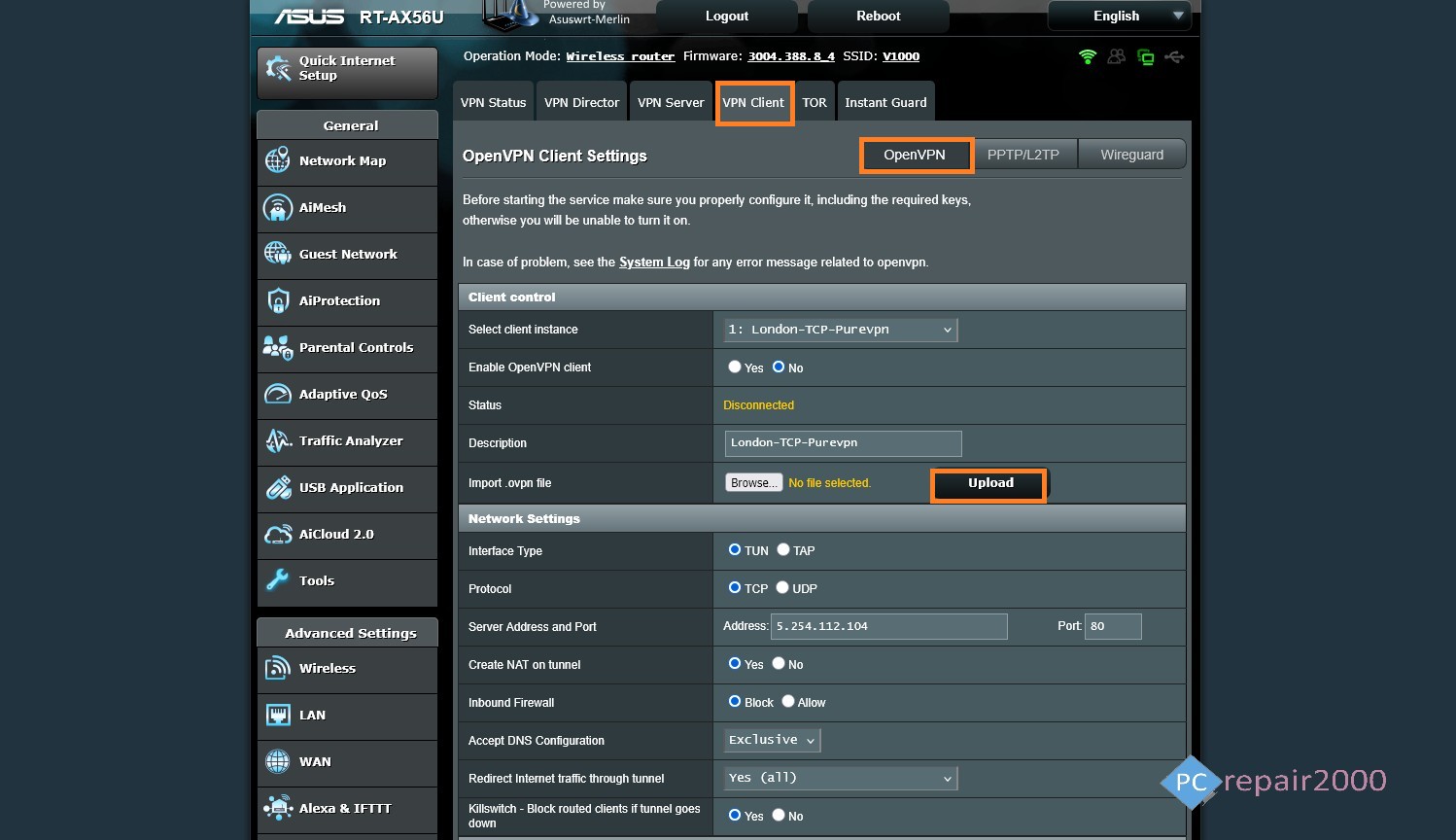
OpenVPN Setup Screen 1
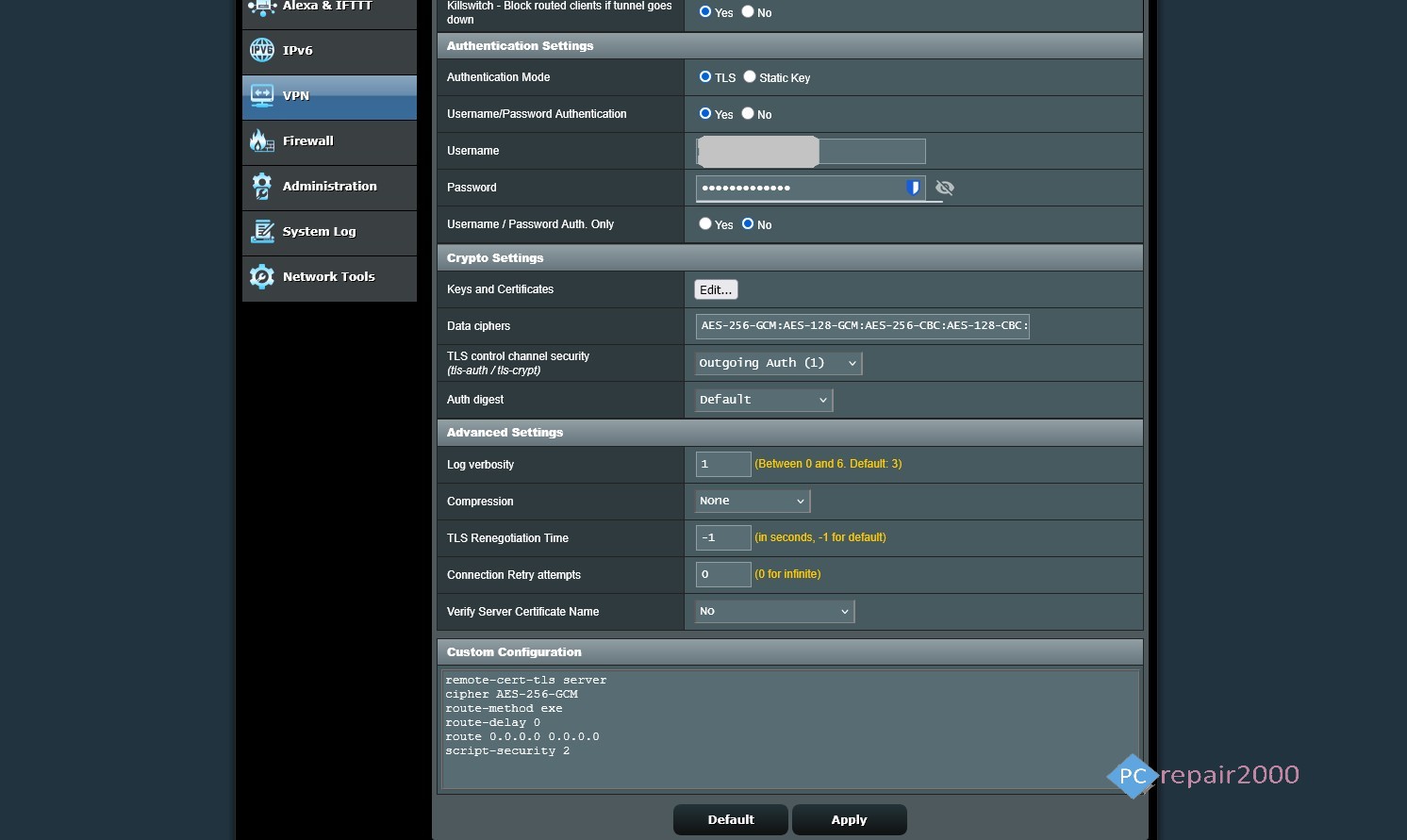
OpenVPN Setup Screen 2
3.1 OpenVPN Routers:
List of some routers that support OpenVPN protocol:
Asus VPN Routers:
All RT-AX routers listed above support OpenVPN, in addition:
Asus RT-A56U, RT-AC66U, RT-AC85P, RT-AC86U, RT-AC87U, RT-AC88U, RT-AC3100, RT-AC3200, RT-AC5300
Synology VPN Routers:
Synology RT-2600ac, MR2200ac, RT-6600ax, WRX560
TP-Link VPN Routers:
TP-Link ER605, TL-R605, ER7206, ER707-M2, ER-706W
TP-Link Archer C7, A7, AX10, AX50, AX73,
Deco Mesh Systems
Linksys VPN Routers:
Linksys WRT1200AC, WRT1900AC, WRT3200ACM, WRT32X, LRT214, LRT224
Netgear VPN Router:
Nighthawk Wi-Fi Routers
Orbi Mesh Systems
3.2 OpenVPN Configuration File:
Navigate to your Asus router VPN section then select client VPN and choose the OpenVPN option. The settings in the configuration file for this protocol are shown in the screenshot below. Upload the configuration file, which has the extension [.ovpn] by accessing your online paid VPN account.
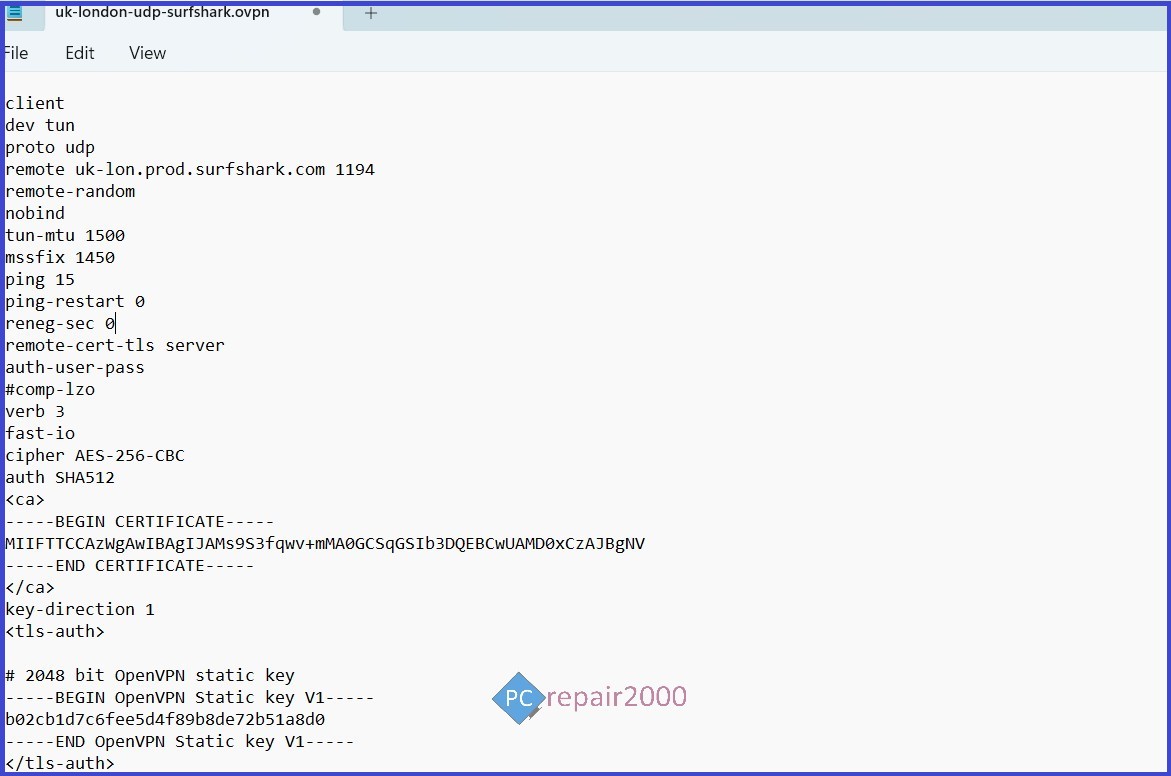
OpenVPN Configuration File
On your VPN online account, select manual setup, then choose the OpenVPN option and select your country, see the screenshot below. You need to upload this file in the Asus router OpenVPN setup page by clicking on browse button, as shown in settings screenshot. The password and username fields relates to your paid VPN account and they are usually different from your main VPN account management credentials.
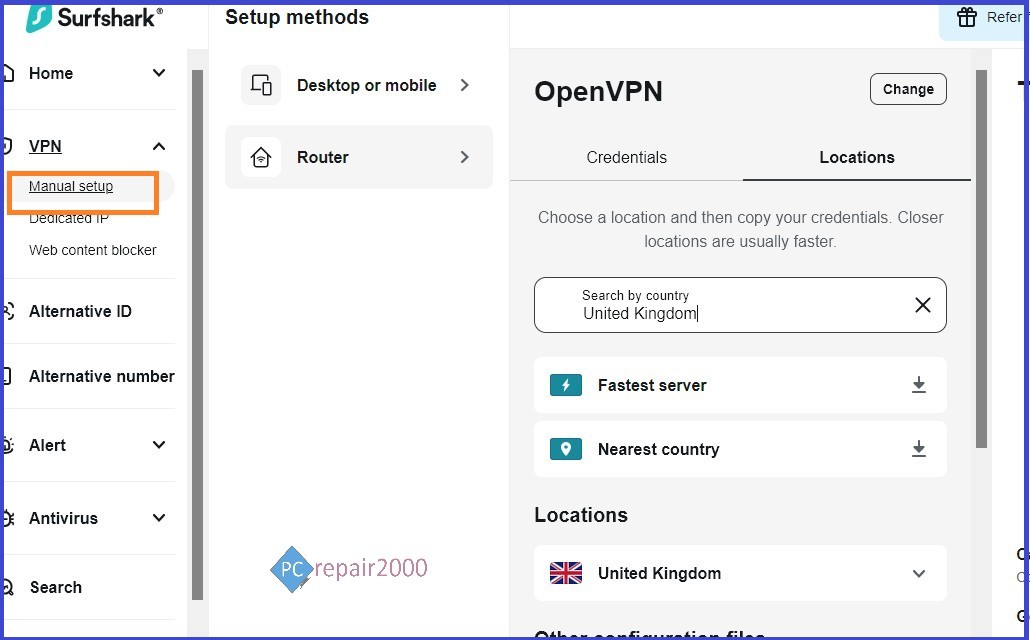
OpenVPN Account Setup
3.3 OpenVPN Kill Switch:
To prevent communication with your ISP when the VPN link is disconnected, you need to set the kill switch to on. This feature is only available in Merlin custom firmware for Asus routers. Set the option Redirect internet traffic through tunnel to Yes (All), see the OpenVPN setup screenshots listed above.
3.4 OpenVPN DNS Servers:
To prevent DNS leak, you need to specify DNS servers that belong to your VPN provider. In order to achieve that you need to apply the Merlin custom firmware. In your Asus OpenVPN setting page, you need to select Accept DNS Configuration to Exclusive, see the OpenVPN setup screenshots listed above . This will prevent using public DNS servers and hence prevent DNS leak and make your connection more secure.
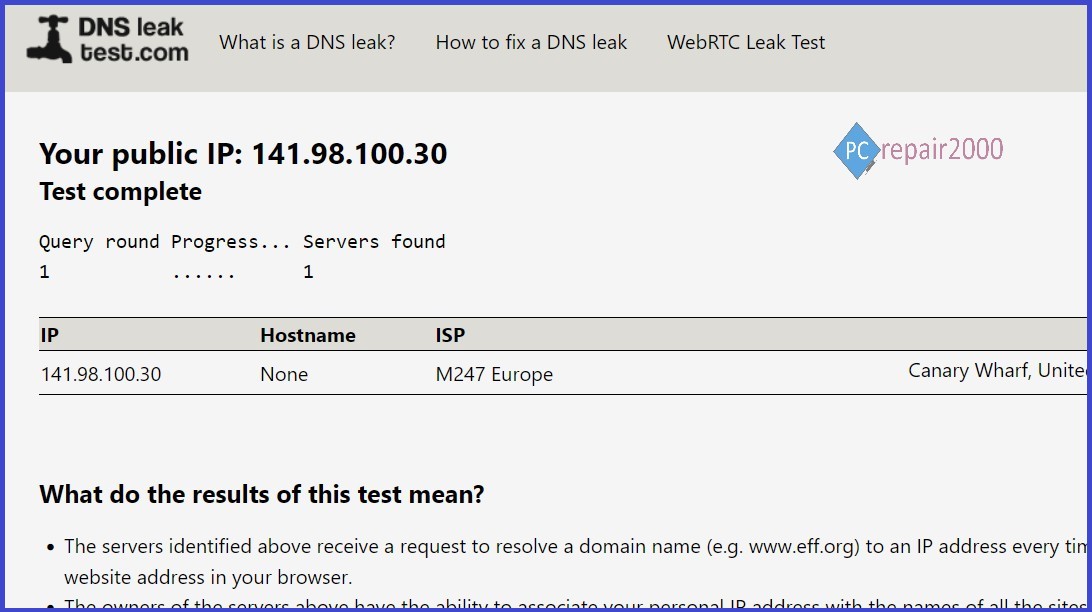
DNS Leak Test
4. VPN Network Setup
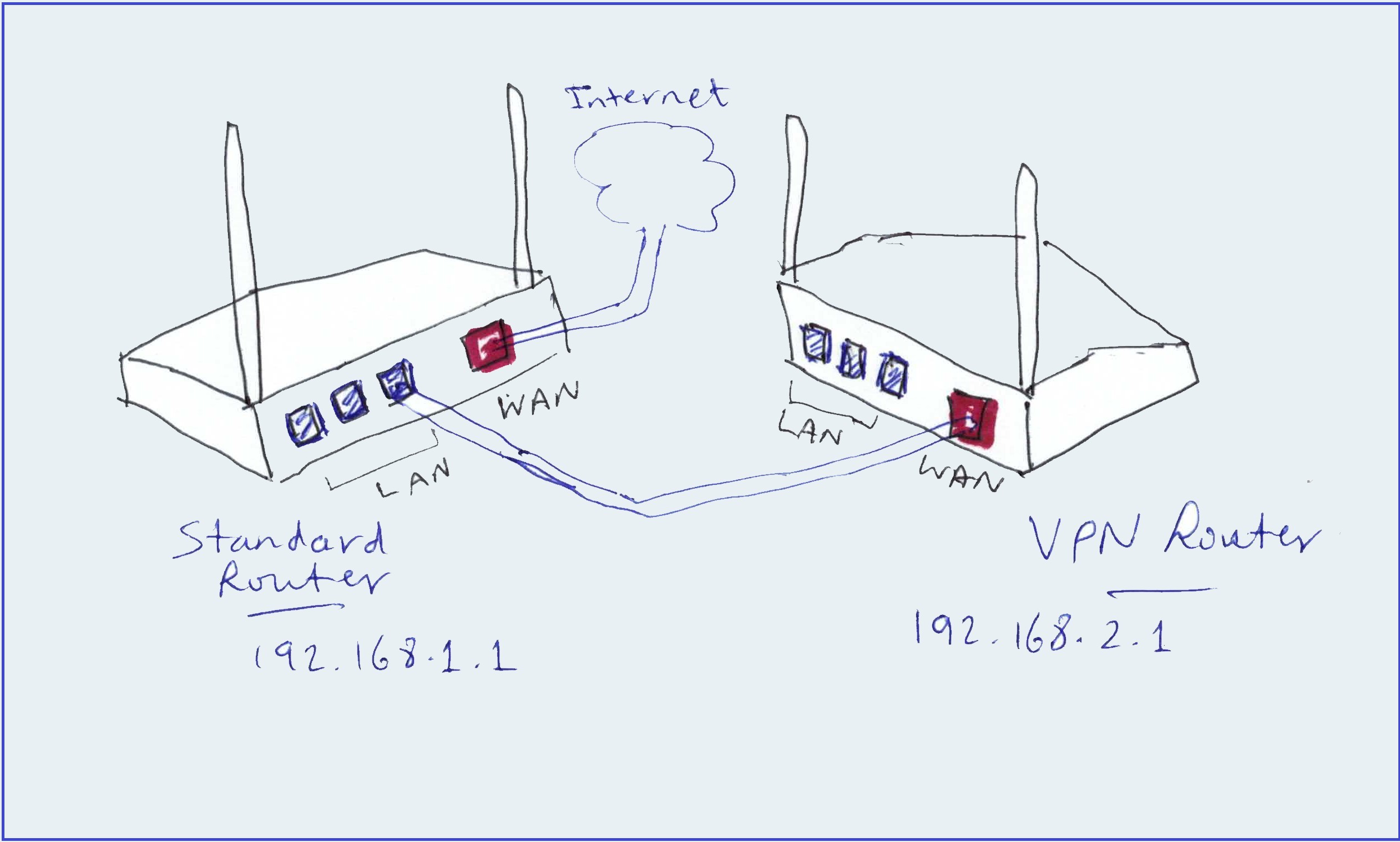
You need to have 2 routers, one of which is your normal internet router provided by your internet service provider. A further router, Preferably Asus router, is needed to act as a VPN router, see the screenshot listed earlier in this article.
The setup is fairly simple:
1. you keep your standard internet router unchanged.
2. Add the Asus VPN router, connect the LAN port from Standard router to WAN port on the VPN router.
3. If the standard router has the IP address 192.168.1.1 allocate the VPN router a different subnet address like 192.168.2.1.
4. Make sure that both routers have different Wi-Fi network name.
Now you can access both routers independently using their different IP address, and different wireless network name. The standard router will provide none encrypted communication, while the VPN router will encrypt all devices connected to its network.
Alternative method [Using One Router Only]
You can remove your standard router and replace it with the VPN router. You will need to setup some rules based on IP address range to allow certain devices to have encrypted connetion (VPN) while the other devices have non-encrypted communication. This method is less flexible, so the dual routers is highly recommended.
5. Summary
WireGuard and OpenVPN protocols are widely used nowadays by both business and private users due to its high level of security and ease of use. Asus VPN routers are among the best in this field and with the added advantage of Merlin custom firmware its features are further extended. YOu can choose OpenVPN or WireGuard protocol based on your equipments and need. However, It is important that you ensure three important factors for safe VPN use:
- Kill switch is enabled, to prevent communication outside the VPN tunnel during disconnections.
- DNS serves are restricted to VPN provider servers, not public DNS servers, to prevent DNS leak and make your communication data visible. WireGuard is more effective in this regards.
- Use a good paid VPN service provider such as; Nord VPN, Express VPN, SurfShark VPN and many others. Avoid Free VPN service like; Proton VPN, Hide Me and Speedify as your data may be compromised and your connection speed is limited.
When comparing the WireGuard VPN and OpenVPN protocols, The WireGuard VPN comes as the clear winner because it uses less resources, more stable connections and incorporates own VPN providers DNS servers. Kill switch is essentially added via the custom firmware which is highly recommended.